Secrets
Secrets let you store sensitive values — API keys, tokens, passwords — in the Admin UI and reference them anywhere in your configuration with ${KEY} syntax. No more hardcoding credentials or juggling environment variables across deployments.
Creating a secret #
Open the Admin UI, click Secrets in the sidebar, then + New Secret.

Fill in the form:
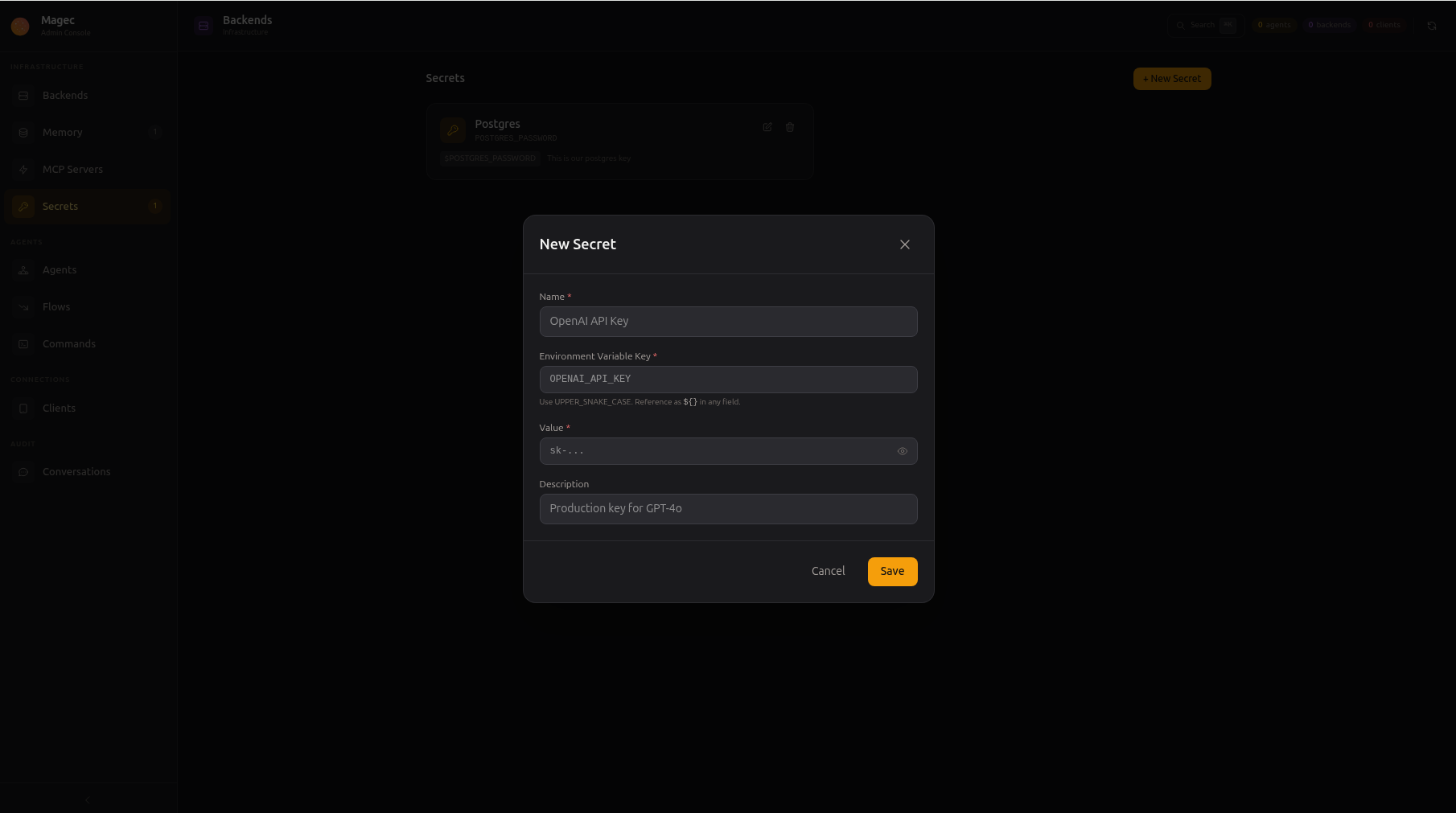
| Field | What to enter | Example |
|---|---|---|
| Name | A human-readable label | OpenAI API Key |
| Environment Variable Key | The key you’ll reference with ${...}. Must be UPPER_SNAKE_CASE. | OPENAI_API_KEY |
| Value | The actual sensitive value. Once saved, it’s never shown again. | sk-... |
| Description | Optional note for yourself | Production key for GPT-4o |
Click Save. The secret is ready to use immediately.
Using secrets in your configuration #
Once created, reference a secret anywhere by wrapping its key in ${...}. For example, when configuring a backend:
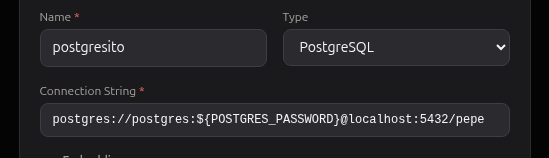
Here the connection string uses ${POSTGRES_PASSWORD} — Magec replaces it with the actual secret value at runtime.
Where you can use ${KEY}
#
Secrets work in every resource field:
| Resource | Example field | Example value |
|---|---|---|
| Backends | API Key | ${OPENAI_API_KEY} |
| Backends | Base URL | ${OPENAI_BASE_URL:-https://api.openai.com/v1} |
| Memory | Connection String | redis://${REDIS_PASSWORD}@redis:6379 |
| MCP Servers | Environment | GITHUB_TOKEN: ${GITHUB_TOKEN} |
| Clients | Token | ${TELEGRAM_BOT_TOKEN} |
The ${VAR:-default} syntax is also supported — if the variable is unset or empty, the default value after :- is used instead.
How it works under the hood #
When Magec starts, all secrets are injected as environment variables. Then every ${VAR} reference in the store is expanded. This means secrets and regular environment variables (from Docker, Kubernetes, systemd) all work the same way.
If you need to understand the expansion pipeline, encryption details, external env var compatibility, or recovery procedures, see Advanced Secrets.
Encryption #
When server.encryptionKey is set in config.yaml, all secret values are encrypted on disk using AES-256-GCM. Without an encryption key, secrets are stored in plain text — a warning is logged to remind you to set one.
See Advanced Secrets — Encryption at rest for the full technical details.