Memory
Memory is what turns a stateless chatbot into an assistant that actually knows you. Without memory, every conversation starts from zero — the agent has no idea who you are, what you’ve discussed before, or what you prefer. With memory, agents remember.
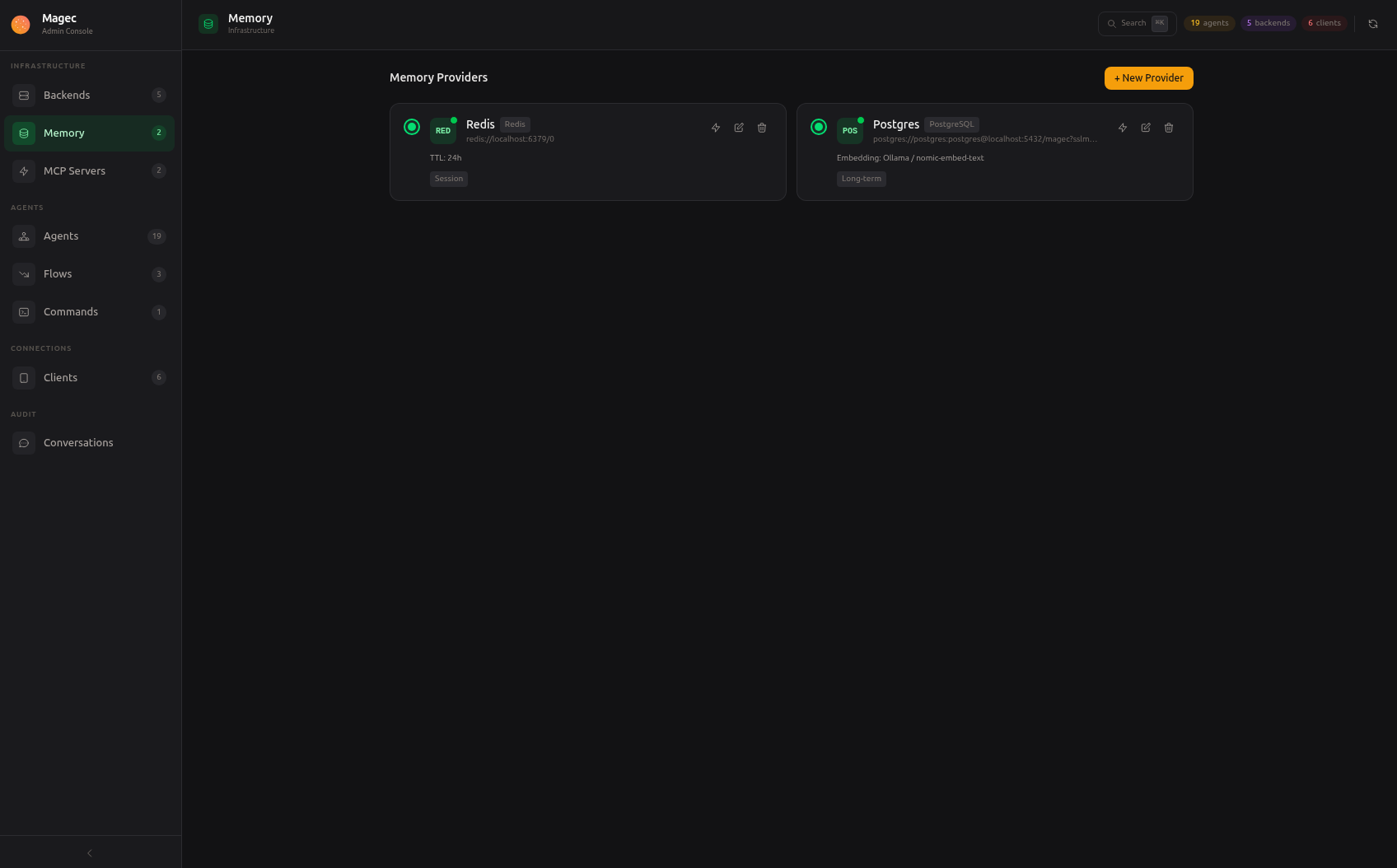
Magec provides two types of memory that work at different scales:
- Session memory — Remembers the current conversation (short-term, like working memory)
- Long-term memory — Remembers facts and preferences across all conversations (persistent, like a personal database)
Both are configured as memory providers in the Admin UI under Memory. Once configured, they apply globally — every agent automatically gets its own isolated memory space within these shared providers. There’s no per-agent memory selection; the infrastructure is shared, but each agent’s data is kept completely separate through unique identifiers.
Session memory (Redis) #
Session memory stores the recent conversation history for each user-agent pair. When enabled, the agent can reference what was said earlier in the conversation without the user repeating it.
This is implemented with Redis, which provides fast read/write access and automatic expiration. Each conversation session gets its own entry in Redis, identified by the user ID and session ID.
How it works #
- User sends a message to the agent
- Magec loads the session history from Redis (all previous messages in this session)
- The agent sees the full conversation context and responds accordingly
- The new messages (user + agent response) are appended to the session
- After the configured TTL expires, old sessions are automatically cleaned up
Configuration #
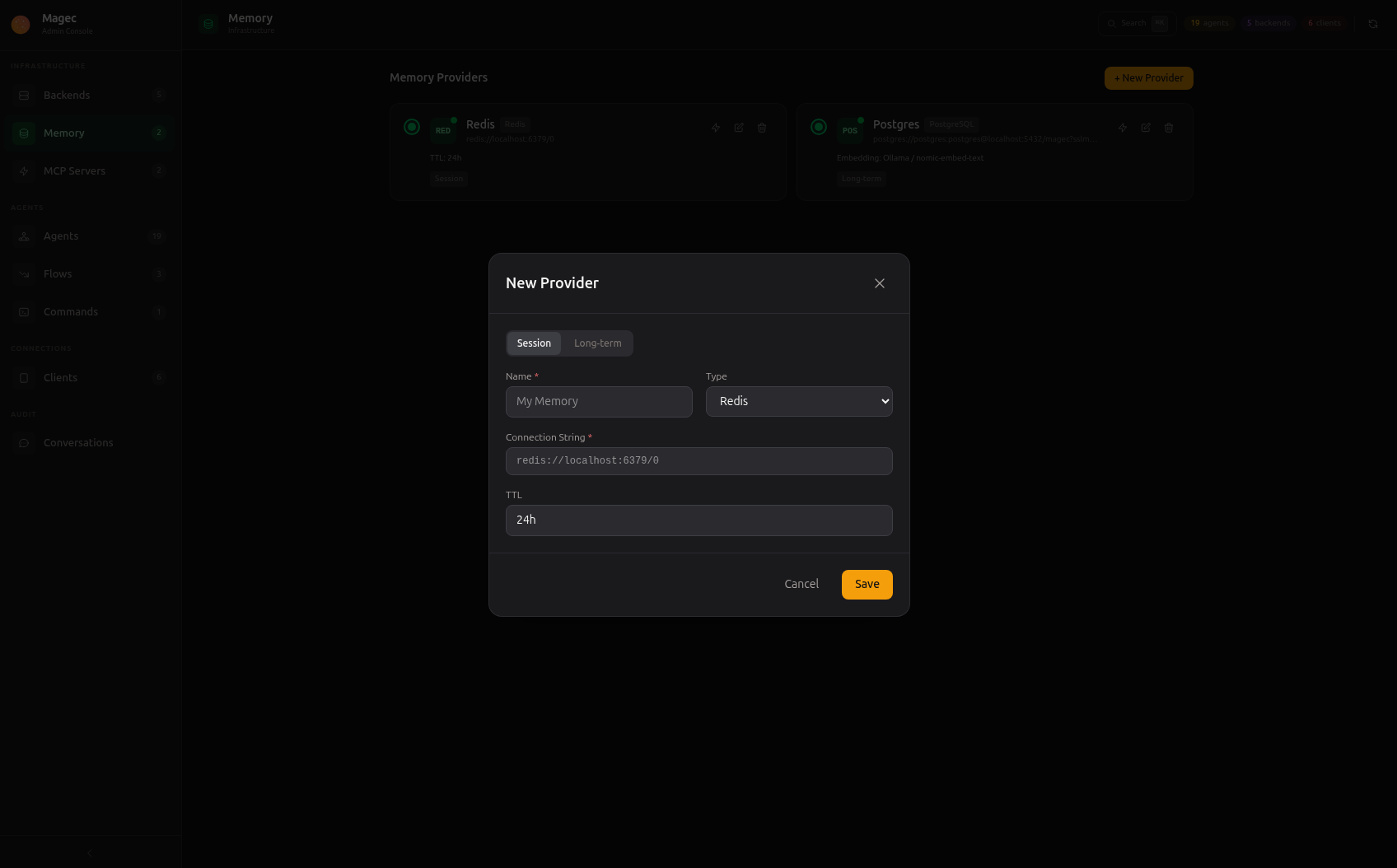
Create a session memory provider in the Admin UI under Memory:
| Field | Description |
|---|---|
name | Display name (e.g., “Redis Sessions”) |
type | redis |
connectionString | Redis URL — e.g., redis://redis:6379 or redis://user:password@host:6379/0 |
ttl | Time-to-live for session entries — e.g., 24h, 72h, 168h (1 week). After this period, unused sessions expire. |
When to use it #
Most agents should have session memory enabled. Without it, the agent can’t even remember what was said two messages ago — every message is processed in isolation, which makes for a very frustrating conversation experience.
The main reason to disable it is for one-shot agents that process a single request and don’t need conversational context (like an agent in a cron job).
Long-term memory (PostgreSQL + pgvector) #
Long-term memory gives agents the ability to remember things across sessions and over time. It’s a semantic memory system powered by vector embeddings — the agent doesn’t just store raw text, it stores the meaning of information and can search by similarity.
How it works #
When long-term memory is enabled, Magec automatically gives the agent two tools:
search_memory— Searches for relevant memories based on a query. The agent uses this at the start of conversations to recall relevant context (e.g., “What do I know about this user?”).save_to_memory— Saves a piece of information for future recall. The agent uses this when it encounters important facts (e.g., user preferences, names, decisions).
The agent decides when to use these tools based on instructions that Magec adds to its system prompt. You don’t need to configure the behavior — the agent automatically:
- Searches for relevant memories at the start of each conversation
- Saves important user information and preferences as it encounters them
- References saved memories when they’re relevant to the current conversation
What makes it semantic #
Traditional memory would require exact keyword matches. Magec’s long-term memory uses vector embeddings — mathematical representations of meaning. This means:
- If you told the agent “My name is Ana” three weeks ago, and today you ask “Do you know my name?”, it finds the right memory even though the words are completely different.
- If you mentioned you’re allergic to peanuts in one conversation, and later ask about restaurant recommendations, the agent can surface that allergy information because it’s semantically relevant.
This requires an embedding backend — a model that converts text into vectors. The embedding backend is configured on the memory provider, not on the agent. Any OpenAI-compatible embedding API works (OpenAI, Ollama with nomic-embed-text, etc.).
Configuration #
Create a long-term memory provider in the Admin UI under Memory:
| Field | Description |
|---|---|
name | Display name (e.g., “Long-Term Memory”) |
type | postgres |
connectionString | PostgreSQL URL — e.g., postgres://user:password@postgres:5432/magec?sslmode=disable |
embeddingBackend | The backend to use for generating embeddings (must be OpenAI-compatible) |
embeddingModel | Model name — e.g., text-embedding-3-small, nomic-embed-text |
pgvector/pgvector:pg17 which has this pre-configured.When to use it #
Long-term memory is most valuable for agents that interact with the same users repeatedly:
- Personal assistants — Remember names, preferences, past decisions
- Customer service — Remember past issues, preferred communication style
- Home automation — Remember routines, preferences (“I like the lights dimmed in the evening”)
It’s less useful for agents in flows that process data rather than interact with humans, or for one-shot task agents.
How agents use memory #
Memory is global, not per-agent. Once you create memory providers, all agents automatically use them — no additional configuration needed on the agent side.
Each agent gets its own isolated space within the shared providers:
- In Redis, session history is stored under keys that include the agent ID and session ID — conversations with one agent never mix with another.
- In PostgreSQL, long-term memories are tagged with the agent’s identifier — one agent’s memories are invisible to others.
This means you set up memory once and every agent benefits. A new agent you create tomorrow will automatically have session memory and long-term memory without any extra steps.
Health checks #
The Admin UI includes a health check button for each memory provider. Use it to verify that the connection to Redis or PostgreSQL is working correctly. This is especially useful after initial setup or when troubleshooting connectivity issues.