Agentic Flows
A flow chains agents and logic into one pipeline: research with one agent, review with another, route on quality, notify a webhook. You build them in a visual editor. If you have not created an agent yet, start with Agents.
How a flow is put together #
A flow is a graph of blocks connected by arrows. Each block does one thing. Each arrow carries the output of one block into the next. The Start box marks the entry: drag from its dot to a block, and execution begins there.
Two words come up constantly. Input is the data arriving at a block through its arrow. State is a shared scratchpad any block can read and write. More on both below.
The blocks #
Eight types, grouped by role in the toolbar:
| Block | What it does |
|---|---|
| Agent | Runs one of your agents with the input as its message. |
| Foreach | Runs an agent once per item of a list, concurrently. |
| Subflow | Embeds another flow as a single block. |
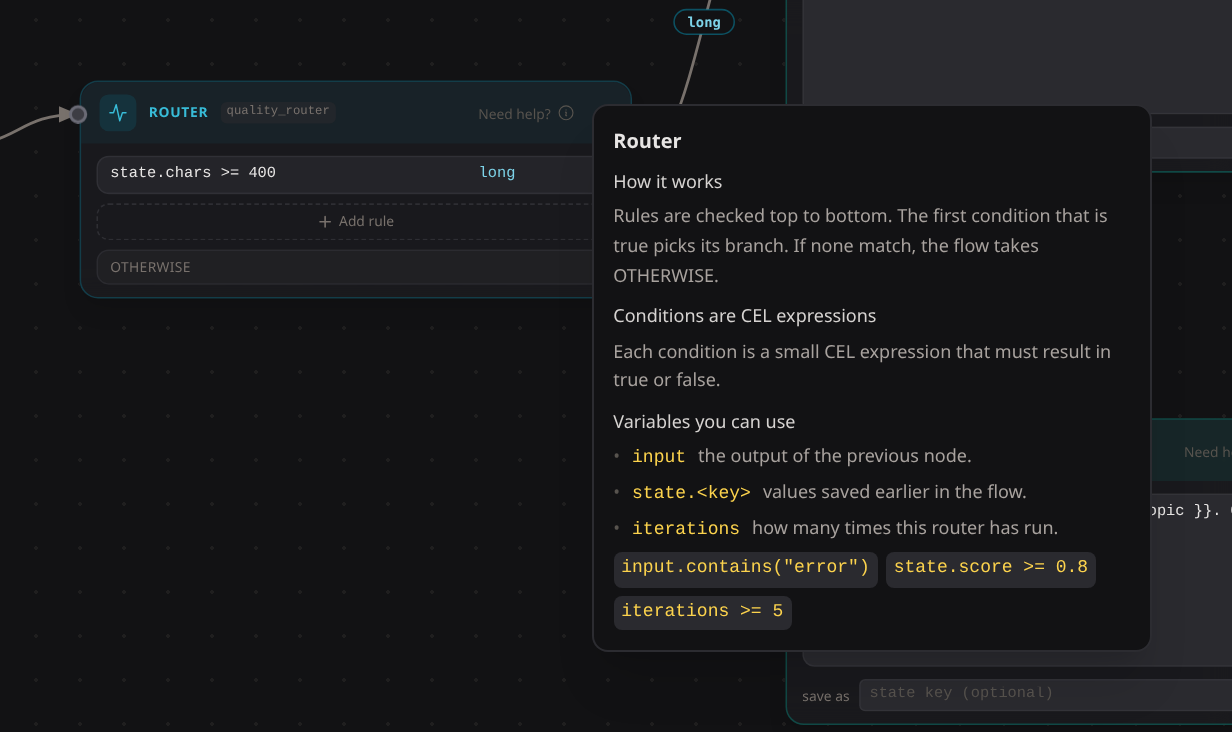
| Router | Takes a decision: evaluates CEL conditions in order and fires exactly one arrow. |
| Join | Waits for several branches and merges their results into one map. |
| Expression | Transforms the input with a CEL one-liner, like input.split(","). |
| Template | Renders text with {{ input }}, {{ state.key }} and {{ secret.KEY }} placeholders. |
| Code | Runs a Starlark script when a one-liner is not enough. |
Two small languages appear here. CEL is for one-liners: router conditions and expressions. Starlark is Python-like and powers the code block, for real logic.
Not sure what a block accepts? Hover Need help? in its header: variables, syntax, examples to paste.
The code block, up close #
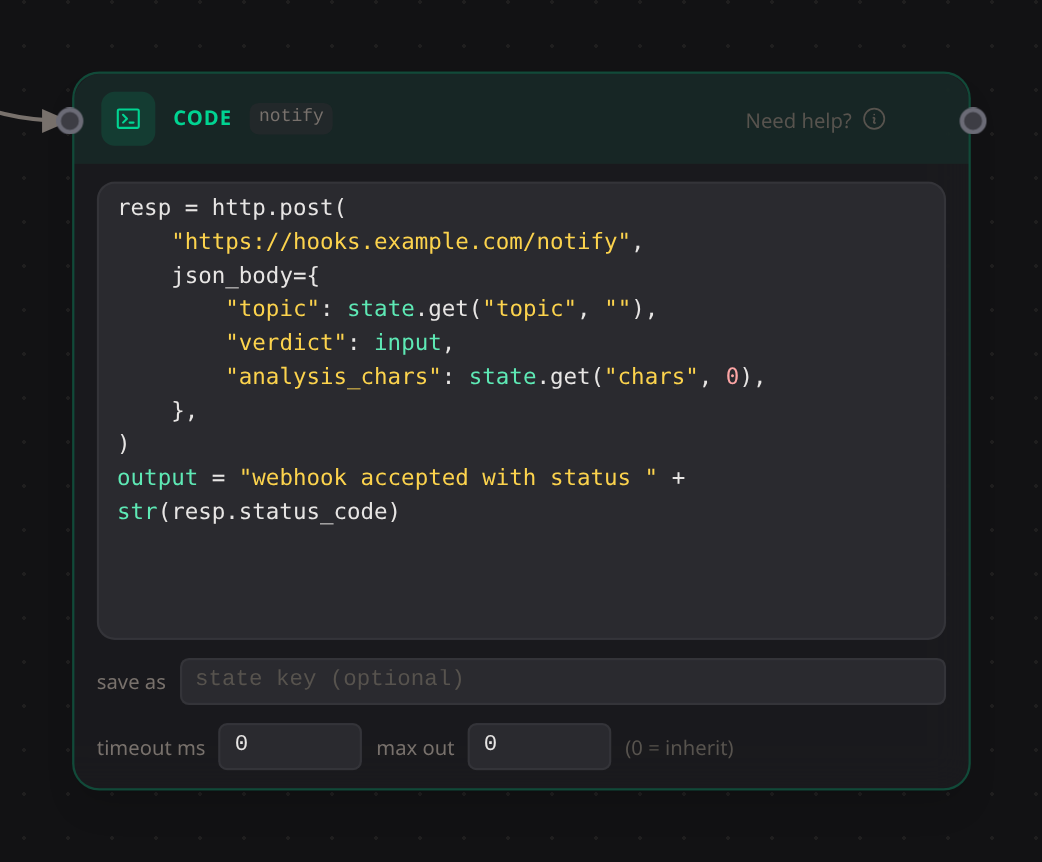
The code block is the escape hatch. Scripts get input and state, assign their result to output, and can use starlet’s libraries directly, no import needed: http, json, re, hashlib and more.
resp = http.post(
    "https://hooks.example.com/notify",
    json_body = {"topic": state["topic"], "verdict": input},
)
output = resp.status_code
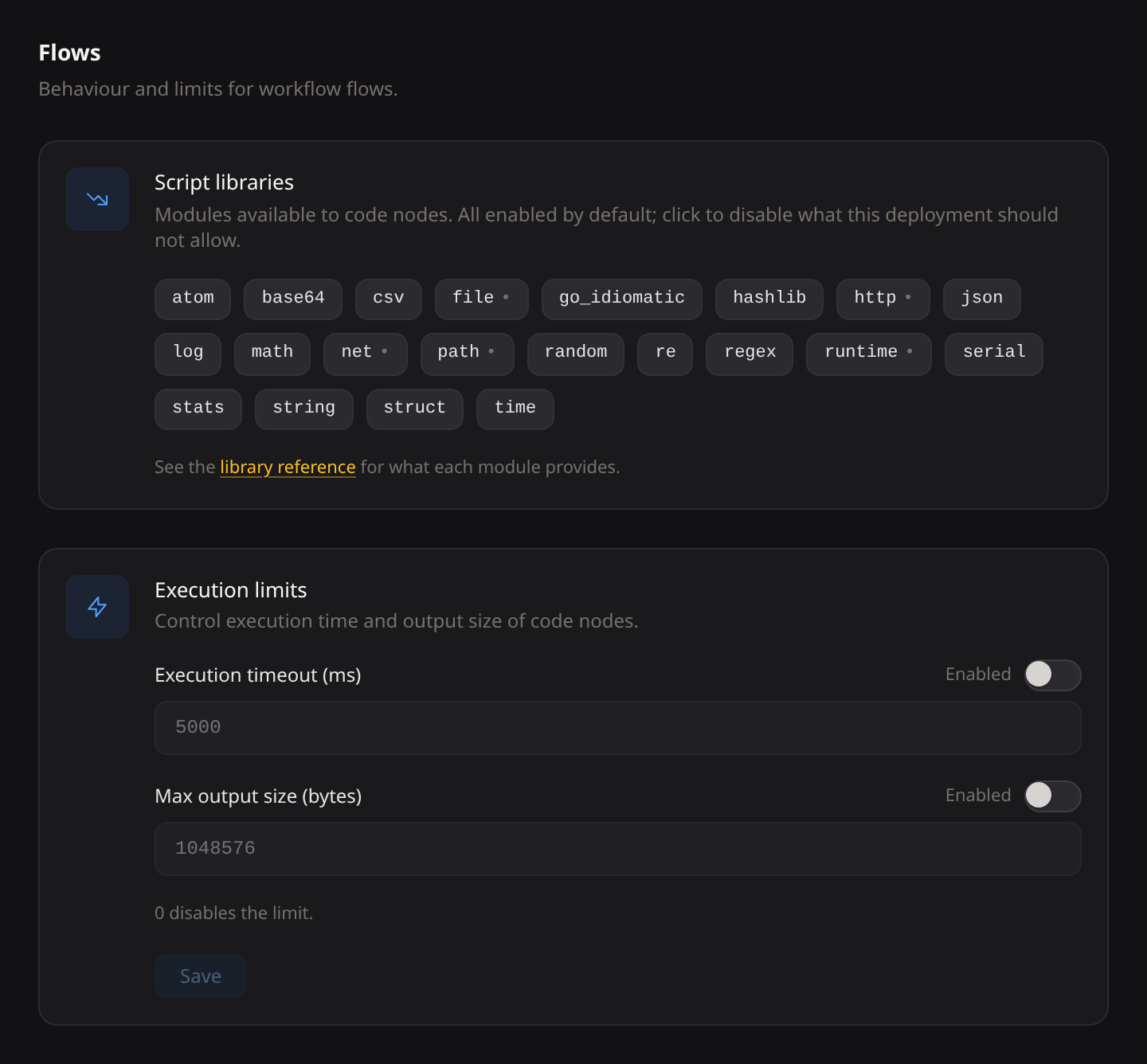
The admin decides which libraries are on, not the flow author. Everything ships enabled; Settings > Flows turns off what your deployment should not have (no http for air-gapped installs, no file if scripts must not touch disk). Execution limits live there too: timeout and output cap, as ceilings a block may only lower.
Your first flow #
- Add a Template block. Write
Answer briefly: {{ input }}. - Add an Agent block and pick an agent.
- Connect Start to the template, and the template to the agent.
- Save.
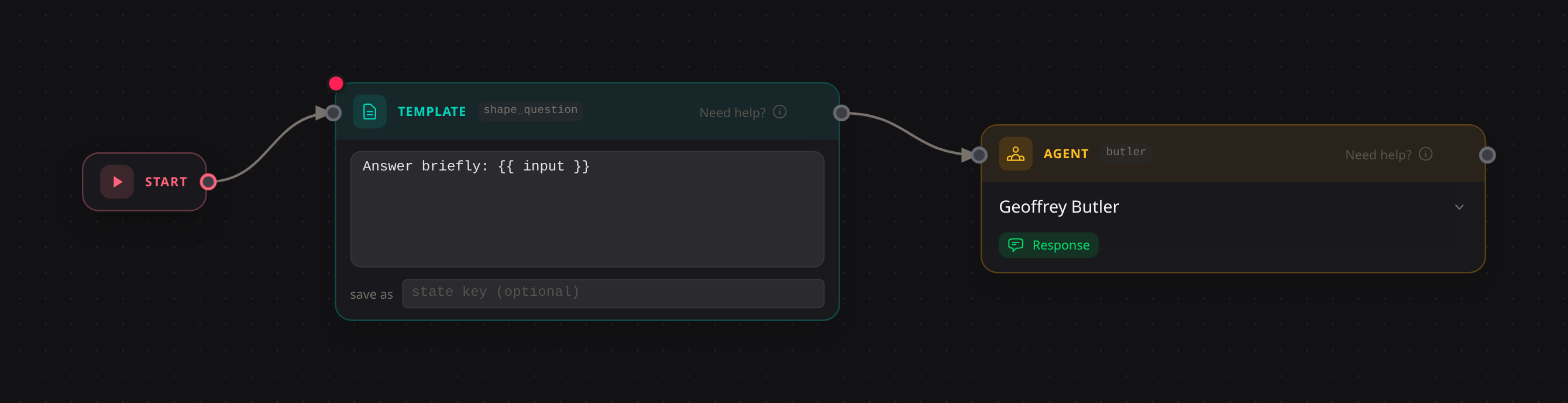
Done. Send it a message: the template wraps your text, the agent answers.
The agent block’s response toggle marks whose output the user sees. With one agent it hardly matters. With five, it hides the intermediate noise.
Editor habits that pay off:
- Full screen (expand button on the zoom bar; Escape twice to leave).
- Ctrl+scroll zooms, plain scroll pans, Fit frames the graph.
- Click a block’s ID chip to rename it; arrows and references follow.
Adding a decision #
Want long questions on your expensive agent and the rest on a cheap one? Put a Router between the template and the agents.
A router holds ordered rules: a CEL condition plus a route. First match wins; the fixed otherwise route catches the rest. Each outgoing arrow carries one route, so exactly one path fires. The input passes through unchanged.
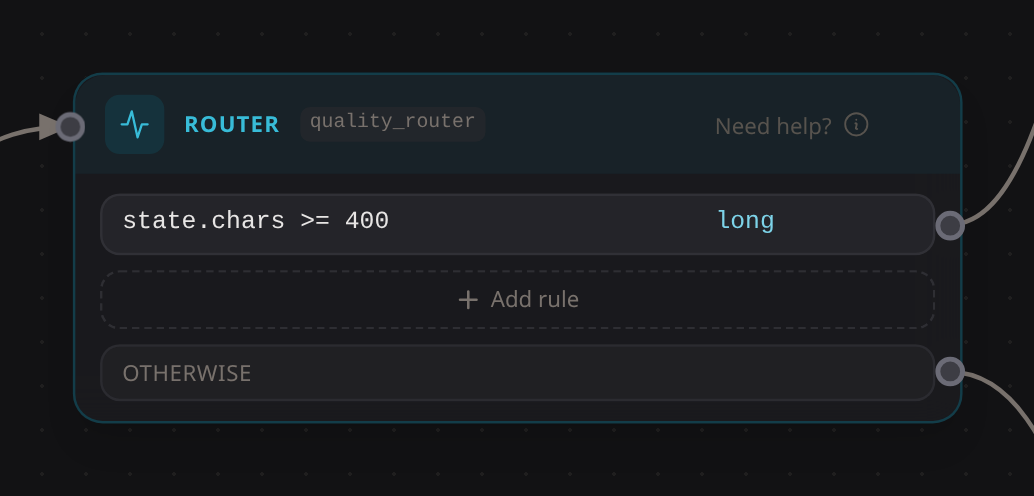
Conditions see input, state and iterations (times this router fired this run) and must return a boolean:
size(input) >= 200
input.contains("urgent")
state.magec_meta.source == "telegram"
Magec compiles every condition on save and rejects the broken ones. A rule that fails at runtime counts as false and the run continues. To experiment, use the CEL playground.
Going parallel #
Drag two arrows out of one block and both targets run at once, each with a copy of the input. The Join block closes the fan: it waits for all branches and emits a map keyed by block ID.
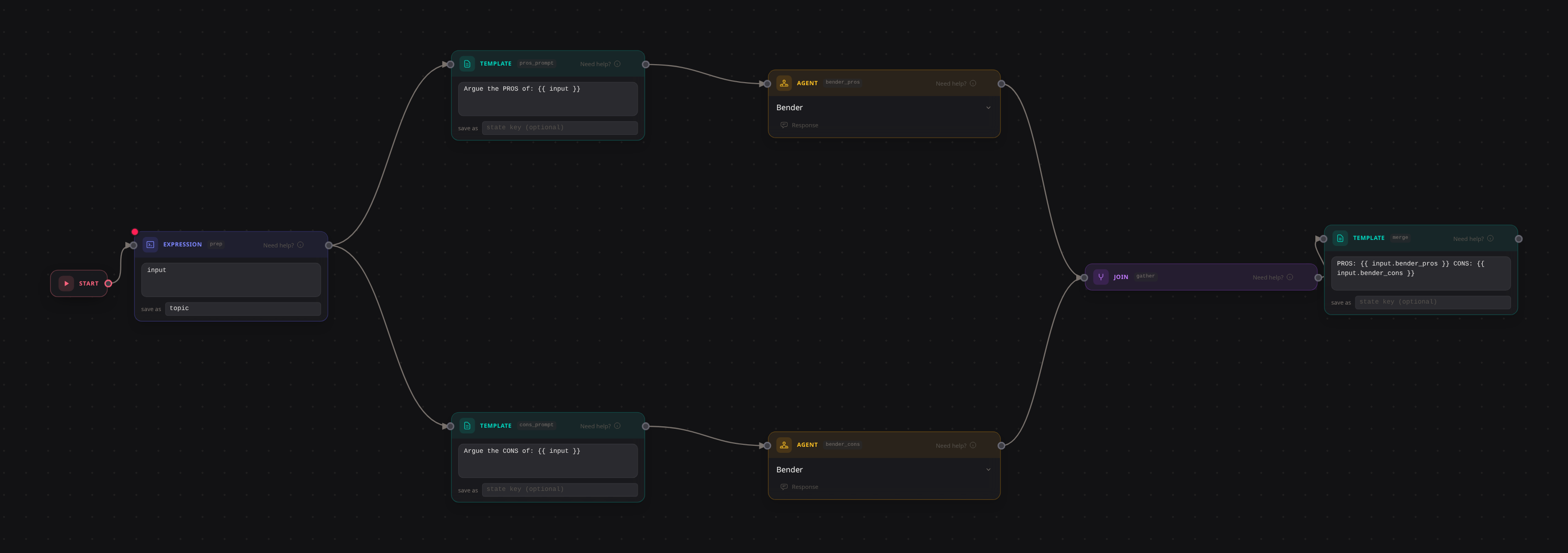
Here gather emits {"bender_pros": ..., "bender_cons": ...}. A template or a script then merges the map.
Sharing data beyond the arrow #
When a later block needs a value from three steps back, use state.
Writing: expression, template and code blocks have an output key field that stores their result under that key. Agents call their set_state tool (they also get get_state; both appear automatically for agents inside a flow).
Reading: state.topic in conditions and expressions, {{ state.topic }} in templates, state["topic"] in scripts.
Secrets work the same way in transform blocks: secret.API_TOKEN in expressions, {{ secret.API_TOKEN }} in templates, secret["API_TOKEN"] in scripts. Values never reach the models: anything leaving for an LLM is scrubbed.
State lasts the whole conversation, not one run: every run in the same conversation reads and writes the same scratchpad, so the next message still sees what the previous one wrote. Each flow has its own state; nothing leaks across flows. Use it for flags, scores, short strings; for documents, use artifacts.
Because state carries over, a flow that depends on a key should set it before reading it. Make the first block initialize what the run needs: an expression with the value false and output key approved resets the flag at the start of every run, no matter what an earlier run left behind.
Client metadata arrives for free in state.magec_meta: messages from Telegram, Discord, Slack or webhooks carry their details there, so a router can branch on where the message came from. The exact keys depend on the client; run the flow once and check the run’s detail.
Looping #
There is no loop block. Point a router backwards:
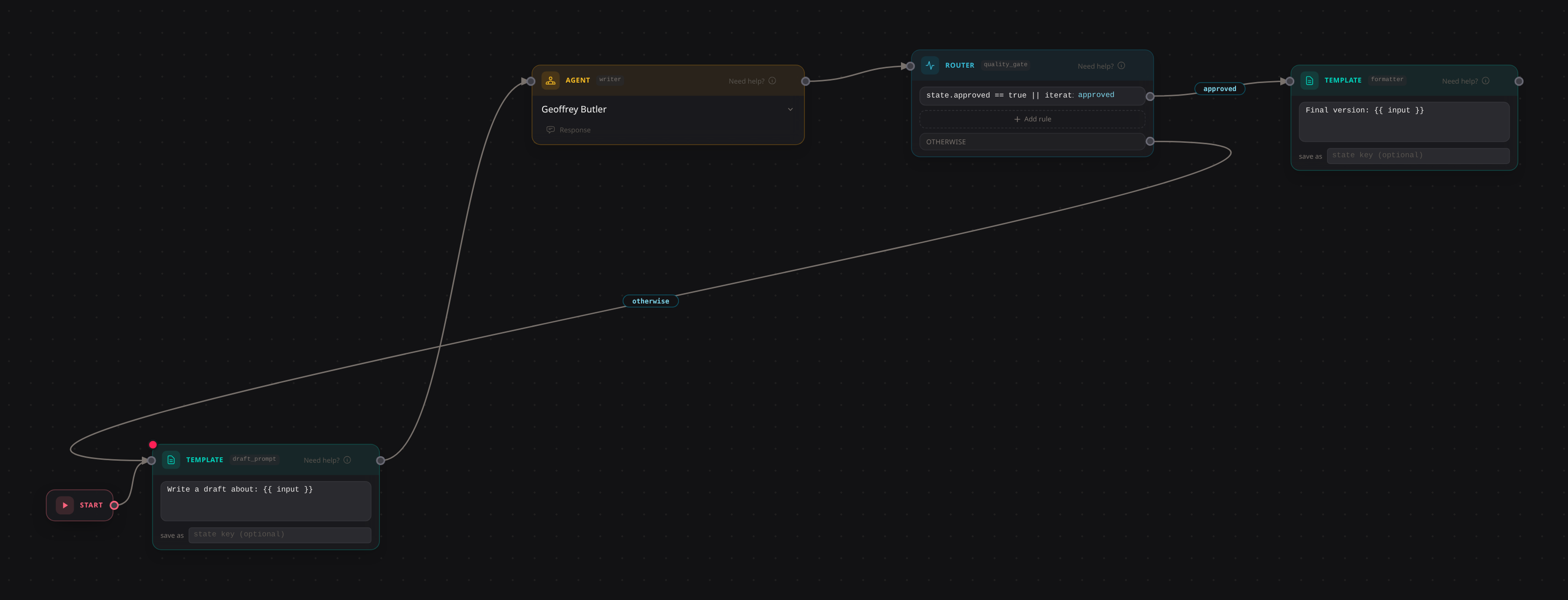
The quality_gate router has one exit rule; the otherwise arrow points back:
state.approved == true || iterations >= 4   ->  approved (forward)
otherwise                                   ->  back to draft_prompt
Each pass, the writer drafts and the gate checks. When an agent has written approved to state, or after four tries, the flow moves on. A template on the back arrow can reshape the retry (“Too short, expand it: {{ input }}”).
Exit conditions worth stealing:
iterations >= 5: five passes, no matter what.state.approved == true: an agent wrote the flag viaset_state.input.contains("DONE"): the agent says so in its output.size(input) >= 400 || iterations >= 3: long enough, or three tries.
Always bound iterations. It saves you the day the LLM never says DONE. Magec kills a run if one router fires over 1000 times, but don’t count on meeting that guard.
A complete flow #
Most of the pieces, in one graph. Takes a topic, argues both sides in parallel, merges, measures, routes on quality.

Left to right: an expression stores the topic, two templates build the PROS and CONS prompts, two agents argue, a join collects, a code block merges, an expression measures, a router decides. Long analyses get a verdict from a third agent plus a webhook; short ones get a rejection template. Thirteen blocks, three agents. The other ten cost no tokens and never hallucinate. That’s the point: you spend LLM calls only where thinking happens.
Watching your flows run #
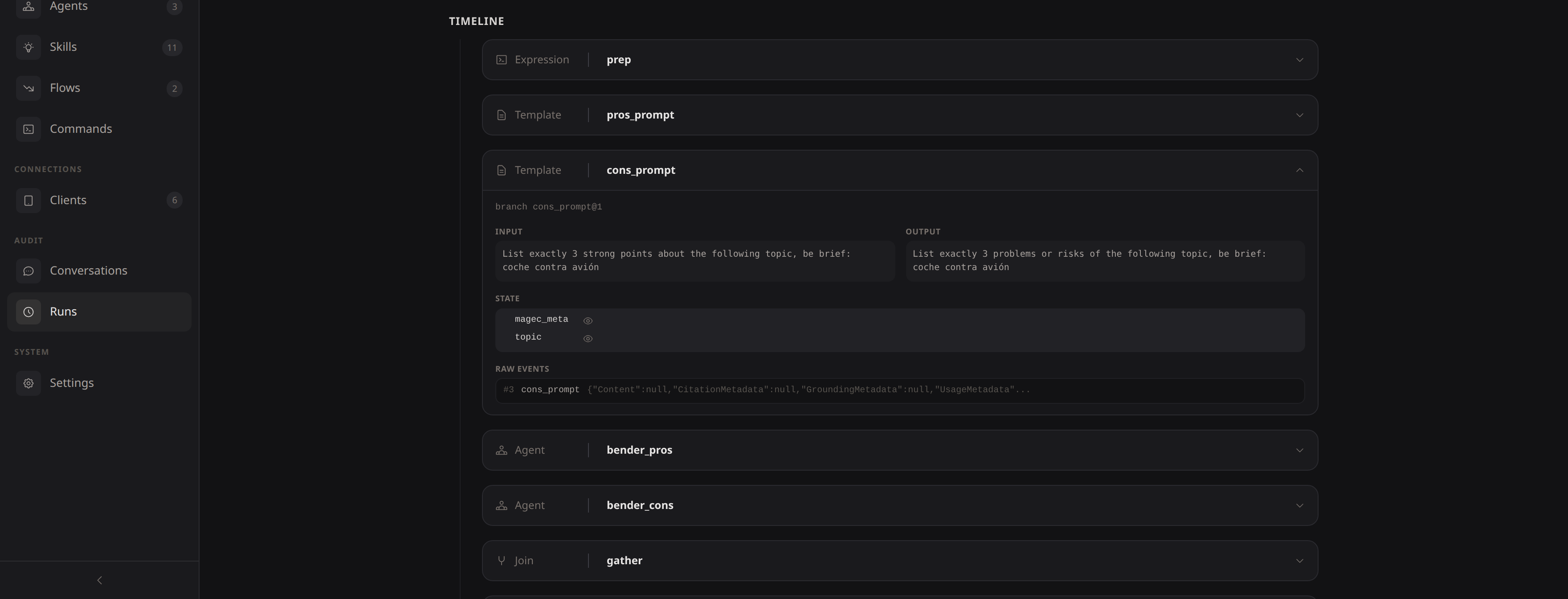
Every run is recorded. The Runs section of the Admin UI shows each execution as a timeline: what went into each block, what came out, which state keys were written, which route fired. When a run fails, the failing block carries the error. Look there first.
Troubleshooting #
The agent never calls set_state. Make it explicit and mandatory in the system prompt. Small models need it repeated.
The loop never exits. Open the run and check what state each block wrote. Missing key? Fix the prompt.
The loop exits on the first pass. Runs in the same conversation share state, so a flag written by an earlier run satisfies the condition immediately. Initialize the key at the start of the flow: an expression with the value false and output key approved clears it every run.
The router takes the wrong route. Rules are ordered, first match wins. Put specific conditions above general ones.
A routed arrow points at a join. Joins wait for all their inputs; a branch that may never fire would deadlock them. Magec rejects this on save.
Spokesperson (Voice UI) #
In the Voice UI you pick which agent is the spokesperson: the voice the user hears. Default: the first agent the flow reaches from its entry. See Voice UI.