Flow Control
This page covers two features that turn flows into coordinated multi-agent workflows. The first is a shared scratchpad that agents can read and write. The second is a way to make loop steps stop before reaching their iteration cap. For an introduction to flows and step types, see Agentic Flows.
The problem #
A basic flow runs each step in order. The output of one step becomes input to the next, but nothing else carries between agents. That works for a research → write → review pipeline, but not for cases like:
- A reviewer wants to signal “we’re done” so the loop stops iterating without burning tokens on extra rounds.
- An agent wants to record a quality score so a later agent can read it.
- A loop should stop when a condition becomes true, not after a fixed number of iterations.
Flow control gives agents the tools to coordinate among themselves, and gives loops a way to react to that coordination.
Shared flow state #
Every agent inside a flow gets two extra tools:
set_state(key, value)records a value (string, number, boolean, list, object) under a key. Other agents in the same flow read it later in the same conversation.get_state(key)reads a value. It returns{found: true, value: ...}when the key exists and{found: false}otherwise.
Keys are simple identifiers: letters, digits, underscores. No dots, no colons, no spaces.
State is shared by every agent in the flow, for the whole conversation. The next user message in the same conversation still sees what the previous turn wrote. State for one flow does not leak into another, each flow has its own.
When to use it #
Use shared state for orchestration signals:
- A flag like
approvedorneeds_revision. - A score like
quality: 0.85. - A short list like
pending_topics: ["X", "Y"].
Don’t use it for bulky content like full documents. For that, use artifacts. The save_artifact tool delivers files to the user automatically.
Exiting loops early #
Loops have a Max iterations cap that always applies. It is a safety net against infinite loops. On top of that, you can add an early exit: a way to stop the loop as soon as some condition is true. There are two strategies:
| Strategy | Decided by | Best for |
|---|---|---|
| Agent decides | An LLM agent calls a tool | Subjective judgement, like “is the answer good enough?” |
| Expression | Magec evaluates a CEL expression | Mechanical condition, like “has the score crossed 0.8?” |
The two strategies are mutually exclusive on the same loop step. Both stack with Max iterations as a hard ceiling.
Configuring early exit #
In the flow editor, click the Mode button on any loop step.
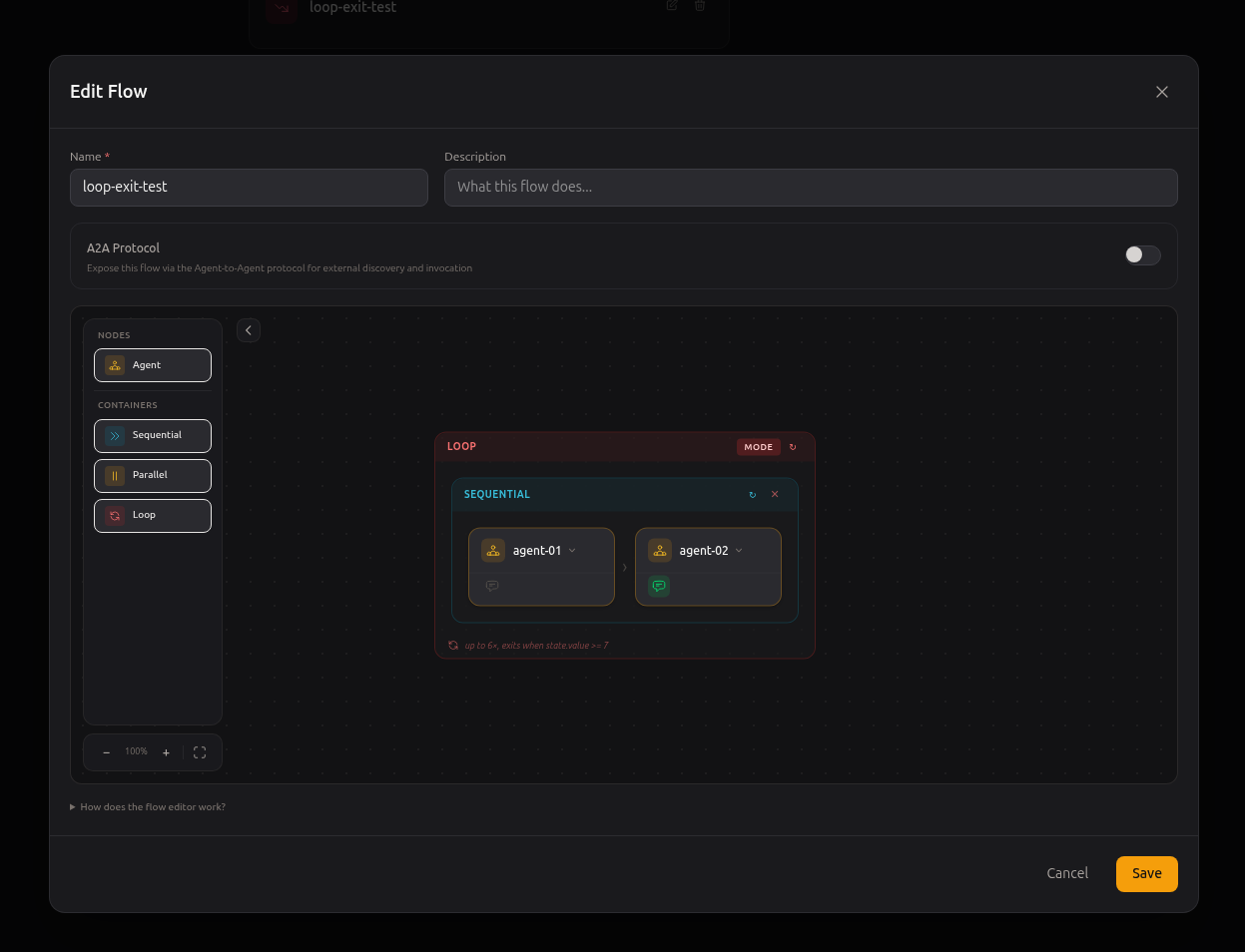
The Loop step settings dialog opens.
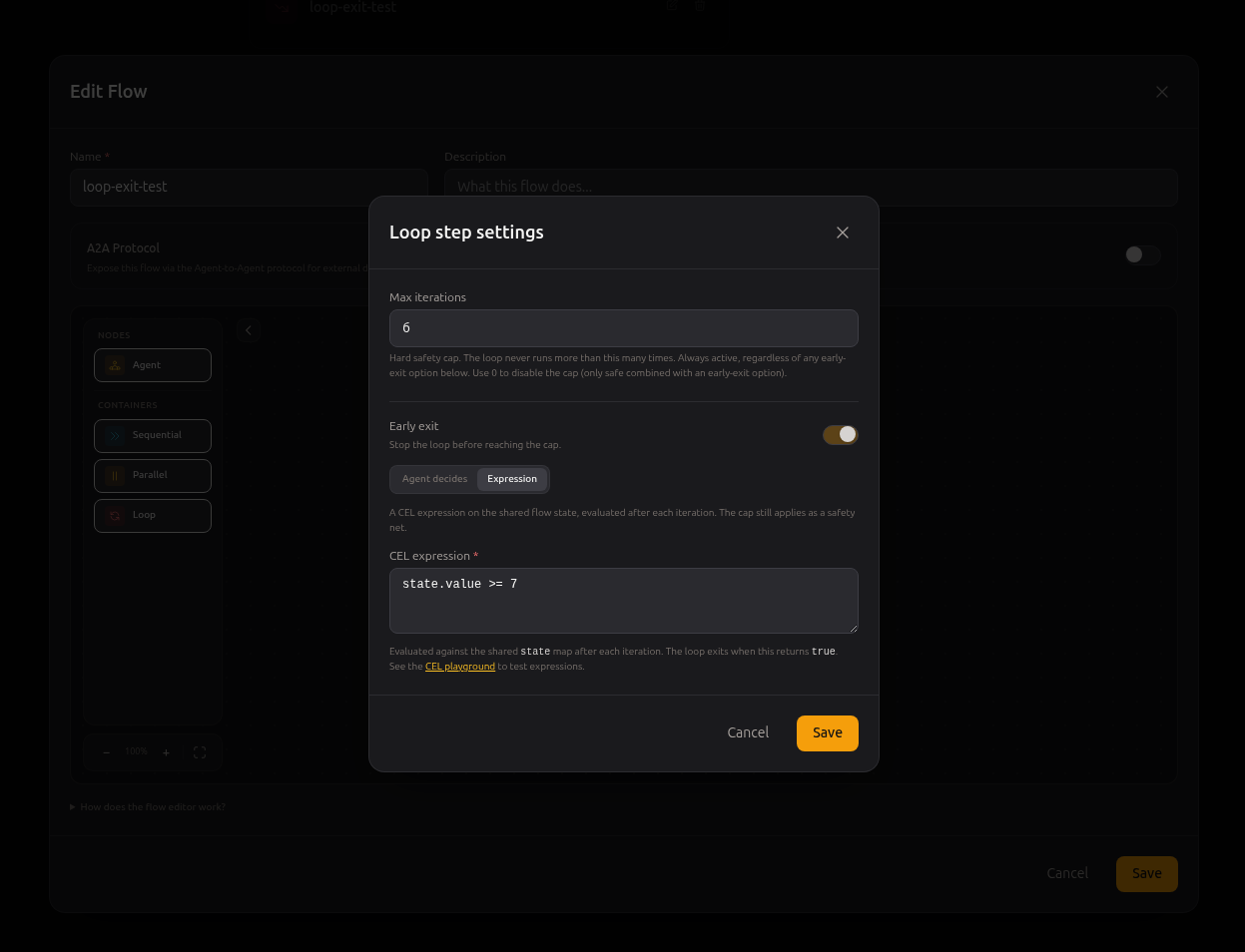
Set Max iterations to whatever cap you want, toggle Early exit on, and pick a strategy.
Strategy: Agent decides #
When an agent inside the loop calls the exit_loop tool, the loop terminates. Use this when an LLM is the right judge of whether the work is done.
Magec injects exit_loop into every agent in the loop’s subtree, no matter how deep through nested sequential or parallel containers. Any of them can call it.
Example: critic loop #
A Generator produces a number. A Critic reviews it and approves or rejects. The loop ends when the Critic approves.
Flow shape:
Loop (max: 8, early exit: agent decides)
└── Sequential
    ├── Generator
    └── Critic   ← marked as response agent
Agent Generator system prompt:
You are a number generator inside a workflow loop.

On every turn:
1. Pick a random integer between 1 and 10. Vary it across turns.
2. Call set_state with key="value" and value=<your number>.
3. Reply with ONLY the number, nothing else.

Do not call get_state. Do not call exit_loop.
Agent Critic system prompt:
You are a quality reviewer inside a workflow loop. You decide whether the number produced by the Generator is good enough, and you stop the loop yourself when it is.

On every turn:
1. Call get_state with key="value". Read the returned `value` field.
2. Decide:
   - If value >= 7:
     - Call exit_loop with no arguments.
     - Reply: "Approved: <value>"
   - If value < 7:
     - Do NOT call exit_loop.
     - Reply: "Rejected: <value>, need higher"

Do not call set_state. You read state, you don't write it.
What you see in the conversation:
Iter 1: Generator picks 4 → Critic reads 4 → "Rejected: 4, need higher"
Iter 2: Generator picks 3 → Critic reads 3 → "Rejected: 3, need higher"
Iter 3: Generator picks 8 → Critic reads 8 → exit_loop() → "Approved: 8"
        loop ends
Tools added to agents in this mode #
Every agent in the loop’s subtree gets:
set_stateandget_state(the same as in any flow).exit_loop, available only when the loop is in Agent decides mode.
Strategy: Expression #
Instead of letting an LLM decide, you write a CEL expression that Magec evaluates against the shared state after every iteration. The loop exits when the expression returns true.
This shifts the decision from the LLM to the orchestration layer. Agents write facts to state, and the workflow watches state and stops on its own.
Example: validation loop #
A Generator produces a number. A Validator reads it and writes a boolean verdict to state. The loop’s expression watches that boolean.
Flow shape:
Loop (max: 10, early exit: expression `state.approved == true`)
└── Sequential
    ├── Generator
    └── Validator   ← marked as response agent
Agent Generator uses the same system prompt as the previous example.
Agent Validator system prompt:
You are a validator inside a workflow loop. You decide whether the latest number is acceptable, and you record your verdict in shared state. You do NOT control loop termination. The workflow handles that based on the state you write.

On every turn:
1. Call get_state with key="value". Read the returned `value` field.
2. Decide:
   - If value >= 7:
     - Call set_state with key="approved" and value=true.
     - Reply: "Approved: <value>"
   - If value < 7:
     - Call set_state with key="approved" and value=false.
     - Reply: "Rejected: <value>"

You do NOT have an exit_loop tool. The workflow exits the loop automatically when state.approved becomes true.
What you see:
Iter 1: Generator → 5 → Validator writes approved=false → "Rejected: 5"
Iter 2: Generator → 9 → Validator writes approved=true  → "Approved: 9"
        workflow evaluates state.approved == true → loop ends
Writing expressions #
The expression has access to one variable, state. It is a map of all the keys written through set_state in the current conversation. You read keys with dot notation.
| Expression | Meaning |
|---|---|
state.approved == true | Stop when the boolean approved is true |
state.score >= 0.8 | Stop when the score reaches 0.8 |
state.attempts >= 3 && state.last_error == "" | Stop after 3 attempts with no error |
has(state.errors) && size(state.errors) == 0 | Stop when the errors list exists and is empty |
state.tag in ["accepted", "skipped"] | Stop when tag matches one of these values |
Expressions follow the CEL syntax. As long as your expression returns a boolean, you can write it however you want.
To experiment, use the CEL playground. Paste your expression there with a sample state map and check whether it returns true or false.
Tools added to agents in this mode #
Every agent in the loop’s subtree gets set_state and get_state. They do NOT get exit_loop. The workflow handles termination, not the agents.
Iteration boundary #
Both early-exit mechanisms fire at the end of an iteration, never mid-iteration. If exit_loop is called by an agent that is not the last in the iteration, the agents that come after still run normally before the loop terminates. The expression is evaluated once per iteration, after the full subtree has finished.
This matches how loops work in the underlying agent runtime, and it keeps each iteration a coherent unit of work. If you need stop-immediate behaviour, restructure the flow so the decider is the last agent in the sequence. Then “end of iteration” coincides with “right after the decider”.
Example with three agents in a sequential inside the loop:
Loop
└── Sequential
    ├── Researcher
    ├── Critic   ← calls exit_loop here
    └── Reporter ← still runs after Critic before the loop exits
If you want Reporter not to run when Critic exits, swap their order so Reporter is before Critic.
Combining state and exit #
The two features are meant to be used together. The most common patterns:
| Pattern | Generator-side | Decider-side | Loop config |
|---|---|---|---|
| Critic loop | Writes its result | Reads state, calls exit_loop | Agent decides |
| Validation loop | Writes its result | Writes verdict to state, no exit | Expression state.approved == true |
| Score threshold | Writes a score | Same agent, no decider | Expression state.score >= 0.8 |
| Bounded retry | Writes attempt count | Same agent | Expression state.attempts >= 5 || state.success |
Always set a sensible Max iterations even when you have an early exit. It is there for the day the LLM hallucinates and never calls exit_loop, or the day a bug in your prompt prevents state.approved from ever being written.
State scope and persistence #
Shared state lives in the conversation’s session. The behaviour you can rely on:
- The second message of a conversation sees state written by the first.
- Two different conversations on the same flow do not share state.
- State never crosses between flows.
Persistence depends on the configured session provider. With Redis or PostgreSQL, state survives restarts. With the in-memory provider, it is gone when Magec restarts.
If you want a fresh state for a new run, reset the conversation from the Admin UI.
Common mistakes #
The agent never calls set_state. Make the system prompt explicit and mandatory: “You MUST call set_state on every turn. The workflow breaks otherwise.” Small models in particular need the instruction repeated.
The loop never exits with Expression. Check that the agent really writes the key the expression reads. Open the conversation in the Admin UI in admin perspective and look for set_state events. If they’re missing, fix the prompt.
The loop exits on iteration 1 unexpectedly. Probably state from a previous run leaked into the new one. Reset the conversation, or use a fresh session ID.
The exit_loop tool is unavailable. Check that the loop’s Mode is set to Agent decides, not Expression or None. Only Agent decides injects exit_loop.
The expression is rejected on save. It must return a boolean. state.score + 1 is a number. Change it to state.score + 1 >= 8 or similar.
What gets injected, summary #
| Context | set_state / get_state | exit_loop |
|---|---|---|
| Standalone agent (not in any flow) | ❌ | ❌ |
| Agent inside a flow, no loop | ✅ | ❌ |
| Agent inside a loop with Mode = None | ✅ | ❌ |
| Agent inside a loop with Mode = Agent decides | ✅ | ✅ |
| Agent inside a loop with Mode = Expression | ✅ | ❌ |
You don’t toggle these manually on the agent. They appear automatically based on where the agent runs.