Clients
Clients are how users and systems interact with your agents. Every conversation in Magec happens through a client — whether it’s a person talking through the Voice UI, a Telegram or Discord bot answering messages, or a cron job running a task on a schedule.
Think of clients as doors into your AI platform. Each door has a lock (authentication token), a list of rooms it can access (allowed agents and flows), and its own way of communicating. You can have as many doors as you need, each configured for a different purpose.
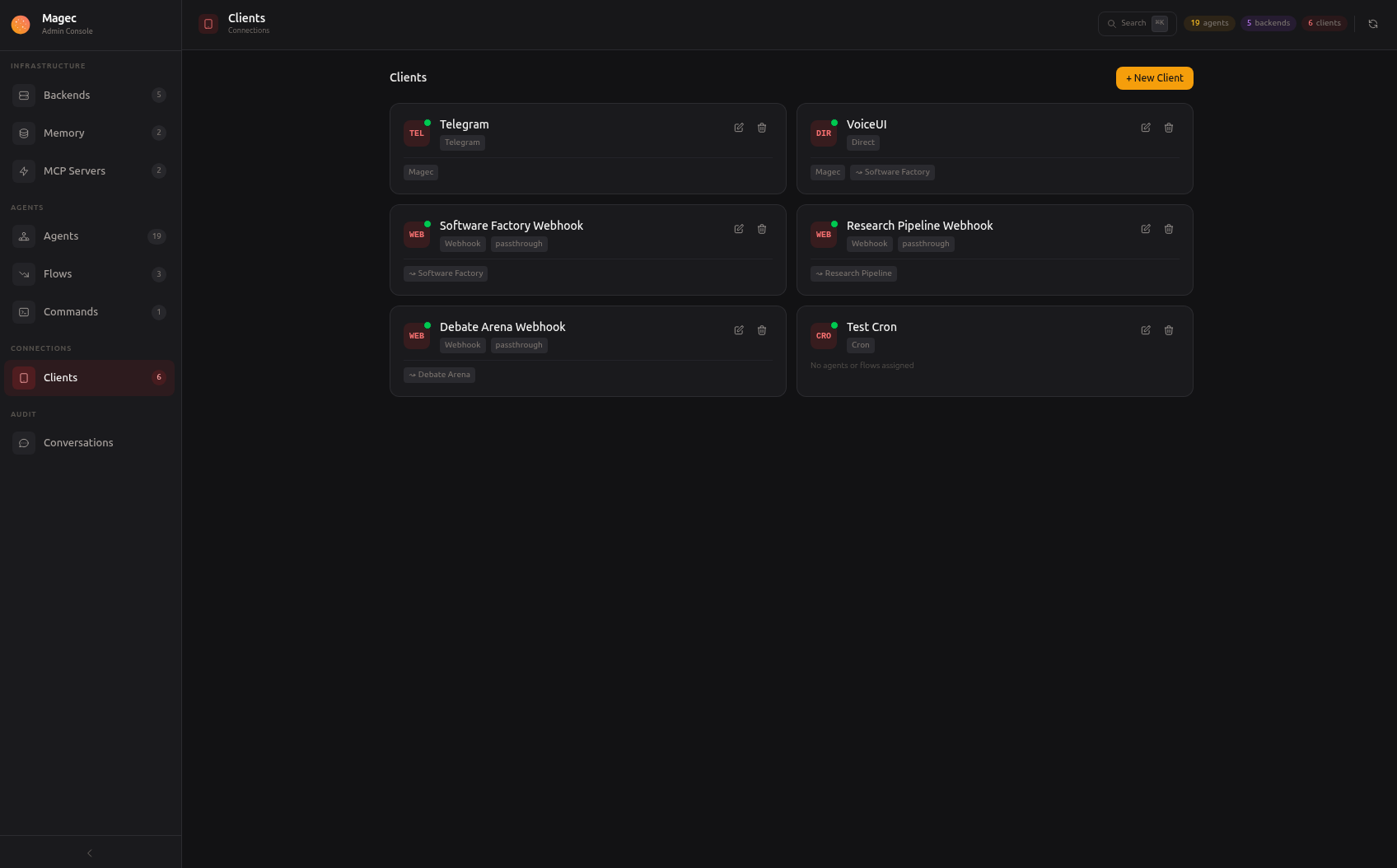
How clients work #
Every client in Magec follows the same pattern:
- Authentication — Each client gets a unique token (prefixed with
mgc_) that authenticates it against the API. The token is generated automatically when you create the client. - Authorization — Each client has a list of allowed agents and flows. It can only interact with the ones you’ve explicitly permitted.
- Transport — Each client type handles its own communication channel. The Voice UI calls the REST API, Telegram polls the Bot API, Slack and Discord connect via WebSocket, webhooks listen for HTTP requests, cron fires on a schedule.
- Execution — All clients end up in the same place: sending a prompt to an agent (or flow) and returning the response through their own channel.
This design means you control exactly who can access what. A Voice UI client for the front desk might have access to a customer service agent only. A Telegram bot for your team might have access to all agents and flows. A cron job might only run a specific daily report.
Client types #
| Type | What it does | Use cases |
|---|---|---|
| Direct | Browser-based access via the REST API. Powers the Voice UI and any custom integration. | Voice interface, custom web apps, API integrations |
| Telegram | Connects a Telegram bot. Users send text or voice messages and get responses. | Mobile assistant, team bot, customer support |
| Slack | Connects a Slack bot via Socket Mode. Users DM the bot or @mention it in channels. | Team workspace assistant, internal tools, ops bot |
| Discord | Connects a Discord bot via Gateway WebSocket. Users DM the bot or @mention it in channels. | Community assistant, server bot, moderation helper |
| Webhook | Exposes an HTTP endpoint that triggers agent invocations. | CI/CD integration, form processing, alert handling, external automation |
| Cron | Runs commands on a schedule — like a cron job that talks to your agents. | Daily reports, periodic health checks, scheduled maintenance |
Each type is covered in detail on its own page:
- Voice UI — Browser-based voice interface with wake word, push-to-talk, agent switching, conversation history, and PWA support
- Telegram — Bot with text and voice messages, response modes, per-chat agent switching, and user restrictions
- Slack — Bot with Socket Mode, text and voice messages, per-channel agent switching, and thread replies
- Discord — Bot with Gateway WebSocket, text and voice messages, per-channel agent switching, and @mention replies
- Webhooks — HTTP endpoint for external system integrations with command and passthrough modes
- Cron — Scheduled tasks that run commands against agents on a configurable schedule
Creating a client #
- Open the Admin UI at
http://localhost:8081 - Go to Clients and click New
- Choose a type
- Give it a name
- Select which agents and flows it can access
- Fill in any type-specific settings (Telegram bot token, cron schedule, etc.)
- Save
Magec generates the authentication token automatically. For Direct and Telegram clients, you’ll use this token to connect. For Slack and Discord, authentication uses their own bot tokens. For webhooks, you include it in the Authorization header. For cron, authentication is handled internally.
Token management #
Each client has a unique mgc_ token. If a token is compromised, you can regenerate it from the Admin UI — the old token stops working immediately and a new one is issued. This doesn’t affect the client’s configuration, just its authentication credential.
Multiple clients, same agents #
You can create as many clients as you need, and multiple clients can access the same agents. For example:
- A Voice UI client for the front desk with access to the Customer Service agent
- A Telegram client for your team with access to all agents
- A Slack client for your workspace with access to work agents
- A Discord client for your community server with access to help agents
- A Webhook client for your CI pipeline with access to the Code Review agent
- A Cron client for daily reports with access to the Analytics flow
Each client has its own token, its own allowed agents, and its own conversation history. They don’t interfere with each other.